🔥 BurnInTest — Professional PC Stress Testing & Hardware Reliability Tool
BurnInTest by PassMark Software is a professional-grade diagnostic utility designed to thoroughly test and verify the stability, reliability, and performance of computer hardware components under extreme load conditions. It’s widely used by system builders, technicians, IT professionals, and hardware manufacturers to identify potential issues before they become serious system failures.
⚙️ What BurnInTest Does
BurnInTest pushes your computer hardware to its limits by simulating high-stress workloads across multiple components. It’s the ultimate tool for detecting intermittent faults, overheating, and stability issues that standard benchmarks or everyday use may never reveal.
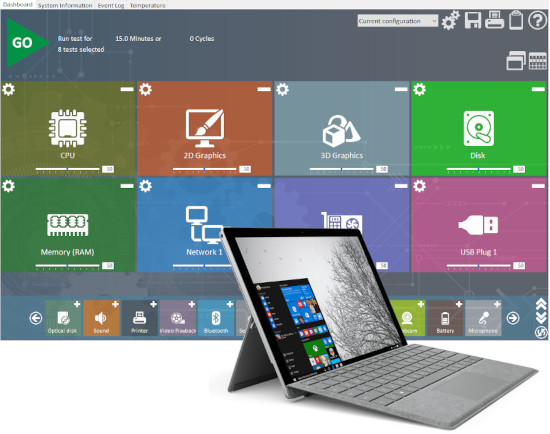
BurnInTest can test:
-
CPU — Multi-core processing, floating-point operations, and math accuracy
-
RAM (Memory) — Detects memory errors and corruption
-
GPU (Graphics) — Tests both 2D and 3D performance stability
-
Disk Drives — Verifies read/write integrity for HDDs, SSDs, and removable drives
-
Network Connections — Checks data integrity over LAN and internet
-
Optical Drives — Tests CD/DVD read/write functions
-
Sound Cards & Peripherals — Validates device functionality and stability
-
Battery, Ports, and Sensors — For laptops and industrial devices
This makes BurnInTest a comprehensive all-in-one stress testing suite capable of detecting even the most elusive hardware faults.
🔍 Real-Time Monitoring & Detailed Reports
During testing, BurnInTest provides live status updates, including component temperatures, voltages, fan speeds, and error counts. After the test, it generates a detailed log and summary report that can be saved, printed, or exported — perfect for quality assurance, RMA verification, or system certification.
🧰 Customizable & Scalable Testing
BurnInTest offers customizable test configurations, allowing users to define the intensity, duration, and specific hardware components to test. Whether you need a quick burn-in check for a new PC build or a 24-hour continuous stress test for a server environment, BurnInTest adapts to your needs.
Advanced users can integrate it into automated test systems or use command-line scripting for batch testing multiple devices — ideal for enterprise and manufacturing workflows.
🧠 Detect Faults Before They Cause Downtime
Hardware issues like faulty RAM, unstable CPUs, or failing drives often cause random system crashes, freezes, or data corruption. BurnInTest helps you find and fix these issues early, reducing downtime and preventing data loss. For PC builders and repair professionals, it’s an indispensable part of pre-deployment testing.
💡 Key Features of BurnInTest
-
Stress tests all major hardware components simultaneously
-
Real-time performance monitoring with visual dashboards
-
Detects intermittent or hidden faults before system failure
-
Generates detailed test logs and certificates for documentation
-
Supports automation via command line and scripting
-
Compatible with Windows, Linux, and macOS systems
-
Available in both Standard and Professional Editions
💻 System Requirements
-
Operating System: Windows 10, 11, 8, 7, Server editions; Linux versions supported separately
-
Memory: Minimum 512 MB RAM (recommended 2 GB+)
-
Disk Space: 100 MB free for installation
-
Processor: Intel or AMD x86-based CPU
🌐 Trusted Worldwide
BurnInTest is used globally by hardware manufacturers, system integrators, and service technicians for quality assurance and system validation. Its precision, reliability, and customizability have made it one of the most respected hardware testing tools in the industry.